<?xml version="1.0" encoding="utf-8"?><feed xmlns="http://www.w3.org/2005/Atom" ><generator uri="https://jekyllrb.com/" version="4.3.2">Jekyll</generator><link href="https://vyspiansky.github.io/feed.xml" rel="self" type="application/atom+xml" /><link href="https://vyspiansky.github.io/" rel="alternate" type="text/html" /><updated>2024-01-11T15:00:19+02:00</updated><id>https://vyspiansky.github.io/feed.xml</id><title type="html">Tech Notes</title><subtitle>Software Developer Blog.</subtitle><author><name>Ihor Vyspiansky</name></author><entry><title type="html">Enable TLS (SSL) database connection and certificate-based authentication</title><link href="https://vyspiansky.github.io/2022/09/23/secure-db-connection-with-certificate-auth/" rel="alternate" type="text/html" title="Enable TLS (SSL) database connection and certificate-based authentication" /><published>2022-09-23T00:00:00+03:00</published><updated>2022-09-23T00:00:00+03:00</updated><id>https://vyspiansky.github.io/2022/09/23/secure-db-connection-with-certificate-auth</id><content type="html" xml:base="https://vyspiansky.github.io/2022/09/23/secure-db-connection-with-certificate-auth/"><![CDATA[<p>This note aims to show step by step how to generate a self-signed SAN SSL/TLS certificate on macOS Monterey and then configure a secure connection and certificate-based authentication for PostgreSQL.</p>

<h2 id="check-openssl-version">Check openssl version</h2>

<p>To avoid using an outdated version of <code class="language-plaintext highlighter-rouge">openssl</code>, it might be a good idea to upgrade it first. The easiest way is to run in a terminal</p>

<div class="language-bash highlighter-rouge"><div class="highlight"><pre class="highlight"><code>brew <span class="nb">install </span>openssl
</code></pre></div></div>

<p>As a result instead of <code class="language-plaintext highlighter-rouge">openssl</code> you will need to use <code class="language-plaintext highlighter-rouge">/usr/local/opt/openssl/bin/openssl</code>.</p>

<p>Let’s check a newly installed version</p>

<div class="language-bash highlighter-rouge"><div class="highlight"><pre class="highlight"><code>/usr/local/opt/openssl/bin/openssl version
</code></pre></div></div>

<p>Output:</p>

<div class="language-plaintext highlighter-rouge"><div class="highlight"><pre class="highlight"><code>OpenSSL 3.0.5 5 Jul 2022 (Library: OpenSSL 3.0.5 5 Jul 2022)
</code></pre></div></div>

<h2 id="creating-a-root-certificate-authority-ca">Creating a Root Certificate Authority (CA)</h2>

<p>The CA certificate is used to verify an authenticity of other certificates during secure communication.</p>

<p>Let’s create two directories named <code class="language-plaintext highlighter-rouge">keys</code> (to store cryptographic keys) and <code class="language-plaintext highlighter-rouge">certs</code> (to store certificates) with the appropriate permissions</p>

<div class="language-bash highlighter-rouge"><div class="highlight"><pre class="highlight"><code><span class="nb">mkdir </span>keys certs <span class="o">&amp;&amp;</span> <span class="nb">chmod </span>og-rwx keys certs
</code></pre></div></div>

<p>Create a trusted root certificate authority (CA):</p>

<div class="language-bash highlighter-rouge"><div class="highlight"><pre class="highlight"><code>/usr/local/opt/openssl/bin/openssl req <span class="nt">-new</span> <span class="nt">-days</span> 365 <span class="nt">-x509</span> <span class="nt">-nodes</span> <span class="se">\</span>
  <span class="nt">-subj</span> <span class="s2">"/CN=Your Company Root CA"</span> <span class="se">\</span>
  <span class="nt">-keyout</span> keys/ca.key <span class="se">\</span>
  <span class="nt">-out</span> certs/ca.crt
</code></pre></div></div>

<h3 id="notes">Notes</h3>

<ul>
  <li>The subject might be more detailed if you want <code class="language-plaintext highlighter-rouge">/C=CN/ST=GD/L=SZ/O=Your Company, Inc./CN=Your Company Root CA</code></li>
  <li>You can also just skip the <code class="language-plaintext highlighter-rouge">-subj</code> parameter within the command and pass all these arguments in the interactive mode.</li>
</ul>

<p>Copy a certificate authority’s (CA) certificate (<code class="language-plaintext highlighter-rouge">ca.crt</code>) from the <code class="language-plaintext highlighter-rouge">certs</code> directory to a PostgreSQL configuration directory:</p>

<div class="language-bash highlighter-rouge"><div class="highlight"><pre class="highlight"><code><span class="nb">mkdir </span>pgconf <span class="o">&amp;&amp;</span> <span class="nb">cp </span>certs/ca.crt pgconf/ca.crt
</code></pre></div></div>

<h2 id="generate-the-postgresql-server-key-and-certificate">Generate the PostgreSQL server key and certificate</h2>

<p>The following code generates a server key and a certificate signing request (CSR), has the CSR signed by the root CA, and adds the server key and certificate to the <code class="language-plaintext highlighter-rouge">pgconf</code> directory with the appropriate permissions:</p>

<div class="language-bash highlighter-rouge"><div class="highlight"><pre class="highlight"><code>/usr/local/opt/openssl/bin/openssl req <span class="nt">-new</span> <span class="nt">-nodes</span> <span class="nt">-out</span> server.csr <span class="se">\</span>
  <span class="nt">-subj</span> <span class="s2">"/CN=postgres"</span> <span class="se">\</span>
  <span class="nt">-keyout</span> pgconf/server.key
</code></pre></div></div>

<h3 id="notes-1">Notes</h3>

<ul>
  <li><code class="language-plaintext highlighter-rouge">CN</code> (Common Name) field should match the hostname of the server.</li>
  <li>If you want to add multiple names in the certificate, you should use the Subject Alternative Name (SubjectAltName, <code class="language-plaintext highlighter-rouge">SAN</code>) instead of <code class="language-plaintext highlighter-rouge">CN</code>.</li>
</ul>

<p>Now, you need to create server certificate with the appropriate <code class="language-plaintext highlighter-rouge">EKU</code> (Extended Key Usage) and <code class="language-plaintext highlighter-rouge">SAN</code> based on your <code class="language-plaintext highlighter-rouge">pgconf/server.key</code> file, e.g.:</p>

<div class="language-bash highlighter-rouge"><div class="highlight"><pre class="highlight"><code>/usr/local/opt/openssl/bin/openssl x509 <span class="nt">-req</span> <span class="nt">-in</span> server.csr <span class="nt">-days</span> 365 <span class="se">\</span>
  <span class="nt">-CA</span> certs/ca.crt <span class="nt">-CAkey</span> keys/ca.key <span class="nt">-CAcreateserial</span> <span class="se">\</span>
  <span class="nt">-out</span> pgconf/server.crt <span class="se">\</span>
  <span class="nt">-extfile</span> &lt;<span class="o">(</span><span class="nb">cat</span> /etc/ssl/openssl.cnf &lt;<span class="o">(</span><span class="nb">printf</span> <span class="s2">"</span><span class="se">\n</span><span class="s2">[SAN]</span><span class="se">\n</span><span class="s2">subjectAltName=IP:127.0.0.1,DNS:localhost,DNS:postgres</span><span class="se">\n</span><span class="s2">extendedKeyUsage=serverAuth"</span><span class="o">))</span> <span class="se">\</span>
  <span class="nt">-extensions</span> SAN
</code></pre></div></div>

<p>Note that <code class="language-plaintext highlighter-rouge">extendedKeyUsage</code> says how a certificate can be used:</p>

<ul>
  <li><code class="language-plaintext highlighter-rouge">clientAuth</code> means it can be used to authenticate a client, i.e. authentication by client certificate when doing mutual authentication.</li>
  <li><code class="language-plaintext highlighter-rouge">serverAuth</code> means it can be used to authenticate a server.</li>
</ul>

<p>Let’s remove currently unnecessary <code class="language-plaintext highlighter-rouge">server.csr</code> file</p>

<div class="language-bash highlighter-rouge"><div class="highlight"><pre class="highlight"><code><span class="nb">rm </span>server.csr
</code></pre></div></div>

<h2 id="configure-postgresql-to-enable-certificate-based-authentication">Configure PostgreSQL to enable certificate-based authentication</h2>

<p>Set the TLS specific settings in <code class="language-plaintext highlighter-rouge">postgresql.conf</code>:</p>

<div class="language-plaintext highlighter-rouge"><div class="highlight"><pre class="highlight"><code>ssl = on # this enables TLS
ssl_cert_file = '/pgconf/server.crt' # this specifies the server certificate
ssl_key_file = '/pgconf/server.key' # this specifies the server private key
ssl_ca_file = '/pgconf/ca.crt' # this specific which CA certificate to trust
</code></pre></div></div>

<p>Let’s explicitly lock down the configuration and TLS-related files:</p>

<div class="language-bash highlighter-rouge"><div class="highlight"><pre class="highlight"><code><span class="nb">chmod </span>og-rwx pgconf/<span class="k">*</span>
</code></pre></div></div>

<h2 id="generating-the-client-key-and-certificate">Generating the Client Key and Certificate</h2>

<p>Now is the moment to configure a client, as failing to do so will prevent anyone from accessing this environment.</p>

<div class="language-bash highlighter-rouge"><div class="highlight"><pre class="highlight"><code>/usr/local/opt/openssl/bin/openssl req <span class="nt">-new</span> <span class="nt">-nodes</span> <span class="se">\</span>
  <span class="nt">-subj</span> <span class="s2">"/CN=user1"</span> <span class="se">\</span>
  <span class="nt">-out</span> client.csr <span class="se">\</span>
  <span class="nt">-keyout</span> keys/client.key
</code></pre></div></div>

<p>Note that the <code class="language-plaintext highlighter-rouge">CN</code> for the client certificate must match the username of the client in the database. For example, if I created a user named <code class="language-plaintext highlighter-rouge">user1</code>, then the <code class="language-plaintext highlighter-rouge">CN</code> value must also be <code class="language-plaintext highlighter-rouge">user1</code>.</p>

<p>Let’s lock down the keys files:</p>

<div class="language-bash highlighter-rouge"><div class="highlight"><pre class="highlight"><code><span class="nb">chmod </span>og-rwx keys/<span class="k">*</span>
</code></pre></div></div>

<p>Generate a certificate with an EKU <code class="language-plaintext highlighter-rouge">clientAuth</code> and <code class="language-plaintext highlighter-rouge">SAN</code>:</p>

<div class="language-bash highlighter-rouge"><div class="highlight"><pre class="highlight"><code>/usr/local/opt/openssl/bin/openssl x509 <span class="nt">-req</span> <span class="nt">-in</span> client.csr <span class="nt">-days</span> 365 <span class="se">\</span>
  <span class="nt">-CA</span> certs/ca.crt <span class="nt">-CAkey</span> keys/ca.key <span class="nt">-CAcreateserial</span> <span class="se">\</span>
  <span class="nt">-out</span> certs/client.crt <span class="se">\</span>
  <span class="nt">-extfile</span> &lt;<span class="o">(</span><span class="nb">cat</span> /etc/ssl/openssl.cnf &lt;<span class="o">(</span><span class="nb">printf</span> <span class="s2">"</span><span class="se">\n</span><span class="s2">[SAN]</span><span class="se">\n</span><span class="s2">keyUsage=digitalSignature</span><span class="se">\n</span><span class="s2">extendedKeyUsage=clientAuth</span><span class="se">\n</span><span class="s2">"</span><span class="o">))</span> <span class="se">\</span>
  <span class="nt">-extensions</span> SAN
</code></pre></div></div>

<div class="language-bash highlighter-rouge"><div class="highlight"><pre class="highlight"><code><span class="nb">rm </span>client.csr
</code></pre></div></div>

<h2 id="connecting">Connecting</h2>

<p>You can use environment variables to specify the options:</p>

<div class="language-plaintext highlighter-rouge"><div class="highlight"><pre class="highlight"><code># the first parameter specifies which TLS mode to use to connect
export PGSSLMODE="verify-full"
# the following two parameters point to the client key/certificate
export PGSSLCERT="`pwd`/certs/client.crt"
export PGSSLKEY="`pwd`/keys/client.key"
# this parameter points to the trusted root CA certificate
export PGSSLROOTCERT="`pwd`/certs/ca.crt"
</code></pre></div></div>

<p>See <a href="https://www.postgresql.org/docs/current/libpq-envars.html">docs on environment variables</a> for details.</p>

<p>Now, attempt a connection using only the certificate, without providing a password:</p>

<div class="language-bash highlighter-rouge"><div class="highlight"><pre class="highlight"><code>psql <span class="nt">-h</span> localhost <span class="nt">-p</span> 5432 <span class="nt">-U</span> user1 postgres
</code></pre></div></div>

<h2 id="throubleshooting">Throubleshooting</h2>

<h3 id="ca-md-too-weak">ca md too weak</h3>

<div class="language-plaintext highlighter-rouge"><div class="highlight"><pre class="highlight"><code>Error: ca md too weak
</code></pre></div></div>

<p>Solution: Update your openssl, for ex., use <code class="language-plaintext highlighter-rouge">brew install openssl</code> on macOS and then <code class="language-plaintext highlighter-rouge">/usr/local/opt/openssl/bin/openssl req -x509 -nodes...</code>.</p>

<p>To determine a path of the openssl executable on your system, run</p>

<div class="language-bash highlighter-rouge"><div class="highlight"><pre class="highlight"><code><span class="nv">$ </span>which openssl
/usr/bin/openssl
</code></pre></div></div>

<p>Before (on macOS):</p>

<div class="language-bash highlighter-rouge"><div class="highlight"><pre class="highlight"><code>openssl version
</code></pre></div></div>

<p>Output: LibreSSL 2.8.3</p>

<p>After:</p>

<div class="language-bash highlighter-rouge"><div class="highlight"><pre class="highlight"><code>/usr/local/opt/openssl/bin/openssl version
</code></pre></div></div>

<p>Output: OpenSSL 3.0.5 5 Jul 2022 (Library: OpenSSL 3.0.5 5 Jul 2022)</p>

<h3 id="wrong-keys-permissions">Wrong keys permissions</h3>

<div class="language-plaintext highlighter-rouge"><div class="highlight"><pre class="highlight"><code>Error: private key file "keys/client.key" has group or world access; file must have permissions u=rw (0600) or less if owned by the current user, or permissions u=rw,g=r (0640) or less if owned by root
</code></pre></div></div>

<p>Solution: Set an appropriate permission and ownership rights for your private key file.</p>

<h3 id="authentication-failed-for-an-user">Authentication failed for an user</h3>

<div class="language-plaintext highlighter-rouge"><div class="highlight"><pre class="highlight"><code>Error: pq: certificate authentication failed for user "&lt;user_name&gt;"
</code></pre></div></div>

<p>Solution: If a certificate was generated with an EKU’s <code class="language-plaintext highlighter-rouge">serverAuth</code>, it should be assigned to a server certificate. If the certificate was generated with an EKU’s <code class="language-plaintext highlighter-rouge">clientAuth</code>, it should be assigned to a client certificate.</p>

<h2 id="references">References</h2>

<ul>
  <li><a href="https://www.crunchydata.com/blog/ssl-certificate-authentication-postgresql-docker-containers">Certificate Authentication Recipe for PostgreSQL Docker Containers</a></li>
  <li><a href="https://www.cybertec-postgresql.com/en/setting-up-ssl-authentication-for-postgresql/">Setting up SSL authentication for PostgreSQL</a></li>
  <li><a href="https://www.ibm.com/docs/en/api-connect/10.0.1.x?topic=certificates-replacing-custom">Replacing custom certificates</a></li>
</ul>]]></content><author><name>Ihor Vyspiansky</name></author><category term="DevOps" /><category term="Mac" /><category term="macOS" /><category term="self-signed certificate" /><category term="Monterey" /><category term="SSL" /><category term="TLS" /><category term="PostgreSQL" /><category term="SubjectAltName" /><category term="SAN" /><category term="CN" /><summary type="html"><![CDATA[This note aims to show step by step how to generate a self-signed SAN SSL/TLS certificate on macOS Monterey and then configure a secure connection and certificate-based authentication for PostgreSQL.]]></summary></entry><entry><title type="html">Too many open files error on macOS</title><link href="https://vyspiansky.github.io/2021/06/22/too-many-open-files-error-on-macos/" rel="alternate" type="text/html" title="Too many open files error on macOS" /><published>2021-06-22T00:00:00+03:00</published><updated>2021-06-22T00:00:00+03:00</updated><id>https://vyspiansky.github.io/2021/06/22/too-many-open-files-error-on-macos</id><content type="html" xml:base="https://vyspiansky.github.io/2021/06/22/too-many-open-files-error-on-macos/"><![CDATA[<p>We’re going to increase an <code class="language-plaintext highlighter-rouge">ulimit</code> setting on macOS, but first let’s obtain the current limit of file descriptors via <code class="language-plaintext highlighter-rouge">ulimit -n</code>.</p>

<p>In case this value has not been changed before, a maximum number of <code class="language-plaintext highlighter-rouge">open files</code> most likely will be <code class="language-plaintext highlighter-rouge">256</code>.</p>

<p>To increase this setting execute</p>

<div class="language-bash highlighter-rouge"><div class="highlight"><pre class="highlight"><code><span class="nb">ulimit</span> <span class="nt">-n</span> 12288
</code></pre></div></div>

<p>where <code class="language-plaintext highlighter-rouge">12288</code> – a desired value.</p>

<p>However keep in mind that <code class="language-plaintext highlighter-rouge">ulimit</code> changes the limit only for current session. So put this command to your <code class="language-plaintext highlighter-rouge">~/.bash_profile</code> file:</p>

<div class="language-bash highlighter-rouge"><div class="highlight"><pre class="highlight"><code><span class="nb">echo</span> <span class="s1">'ulimit -n 12288'</span> <span class="o">&gt;&gt;</span> ~/.bash_profile
</code></pre></div></div>]]></content><author><name>Ihor Vyspiansky</name></author><category term="Mac" /><category term="macOS" /><category term="ulimit" /><summary type="html"><![CDATA[We’re going to increase an ulimit setting on macOS, but first let’s obtain the current limit of file descriptors via ulimit -n.]]></summary></entry><entry><title type="html">How to Write to NTFS Drives in macOS Mojave</title><link href="https://vyspiansky.github.io/2020/01/09/how-to-write-to-ntfs-drives-in-macos-mojave/" rel="alternate" type="text/html" title="How to Write to NTFS Drives in macOS Mojave" /><published>2020-01-09T00:00:00+02:00</published><updated>2020-01-09T00:00:00+02:00</updated><id>https://vyspiansky.github.io/2020/01/09/how-to-write-to-ntfs-drives-in-macos-mojave</id><content type="html" xml:base="https://vyspiansky.github.io/2020/01/09/how-to-write-to-ntfs-drives-in-macos-mojave/"><![CDATA[<p>In case you use NTFS formatted USB drives on your Mac, you can only open files stored on those drives, but you can’t change those files.</p>

<p>In other words,</p>

<ul>
  <li>macOS computers mount NTFS formatted USB drives as “Read Only”;</li>
  <li>“Read Only” mounted drives cannot be written to with macOS computers.</li>
</ul>

<p>There are several ways to work around this problem.</p>

<h2 id="1-change-drive-format-to-exfat">1. Change Drive Format to exFAT</h2>

<p>If you’re going to be transferring files between Mac’s and PC’s use exFAT. The macOS Mojave supports exFAT file format and since Windows does too, converting an NTFS drive to exFAT may solve the problem of accessing the files it contains on both platforms.</p>

<p>If it’s your case, read this</p>

<ul>
  <li><a href="https://support-en.wd.com/app/answers/detail/a_id/20821" title="How to Format a WD hard drive to exFAT or FAT32 File System" target="_blank">https://support-en.wd.com/app/answers/detail/a_id/20821</a></li>
</ul>

<p>However you will lose all the data, and in case you forget to backup first, it will be gone forever.</p>

<h2 id="2-apples-experimental-ntfs-write-support">2. Apple’s Experimental NTFS-Write Support</h2>

<p>The macOS includes experimental support for writing to NTFS drives. However, it’s off by default and requires some messing around in the terminal to enable it.</p>

<p>If you want to take the risk and try them out, read the following tutorial</p>

<ul>
  <li><a href="http://osxdaily.com/2013/10/02/enable-ntfs-write-support-mac-os-x/" title="How to Enable NTFS Write Support in Mac OS X" target="_blank">http://osxdaily.com/2013/10/02/enable-ntfs-write-support-mac-os-x/</a></li>
</ul>

<p>This solution could potentially cause problems with your NTFS file system, so use it with caution.</p>

<h2 id="3-third-party-ntfs-drivers">3. Third Party NTFS Drivers</h2>

<p>Last but not least, there are third party paid drivers that allow Mac users to read, write and access NTFS formatted USB drives without reformatting the drive with exFAT or using of experimental features.</p>

<ul>
  <li>Microsoft NTFS for Mac by Paragon Software</li>
  <li>Microsoft NTFS for Mac by Tuxera</li>
</ul>]]></content><author><name>Ihor Vyspiansky</name></author><category term="Mac" /><category term="NTFS" /><category term="macOS" /><category term="exFAT" /><summary type="html"><![CDATA[In case you use NTFS formatted USB drives on your Mac, you can only open files stored on those drives, but you can’t change those files.]]></summary></entry><entry><title type="html">Using Apache Bench for simple load testing</title><link href="https://vyspiansky.github.io/2019/12/02/apache-bench-for-load-testing/" rel="alternate" type="text/html" title="Using Apache Bench for simple load testing" /><published>2019-12-02T00:00:00+02:00</published><updated>2019-12-02T00:00:00+02:00</updated><id>https://vyspiansky.github.io/2019/12/02/apache-bench-for-load-testing</id><content type="html" xml:base="https://vyspiansky.github.io/2019/12/02/apache-bench-for-load-testing/"><![CDATA[<p>The following command runs <code class="language-plaintext highlighter-rouge">100</code> requests in total with <code class="language-plaintext highlighter-rouge">10</code> concurrent requests to <code class="language-plaintext highlighter-rouge">example.com</code>.</p>

<div class="language-bash highlighter-rouge"><div class="highlight"><pre class="highlight"><code>ab <span class="nt">-n</span> 100 <span class="nt">-c</span> 10 http://example.com/
</code></pre></div></div>

<p><strong>Note!</strong> ApacheBench (ab) is installed on macOS by default.</p>

<p>Output will contain a lot of useful information. However firstly it’s worth paying attention to the following values:</p>

<ul>
  <li>Requests per second</li>
  <li>Failed requests</li>
  <li>Time per request</li>
</ul>

<p>The <code class="language-plaintext highlighter-rouge">-H</code> flag allows you to append extra headers to the request:</p>

<div class="language-bash highlighter-rouge"><div class="highlight"><pre class="highlight"><code>ab <span class="nt">-n</span> 100 <span class="nt">-c</span> 10 <span class="nt">-H</span> <span class="s2">"Accept-Encoding: gzip,deflate"</span> http://example.com/
</code></pre></div></div>

<p>The argument is typically in the form of a valid header line, containing a colon-separated field-value pair (ex., <code class="language-plaintext highlighter-rouge">"Accept-Encoding: gzip,deflate"</code>).</p>

<p>The <code class="language-plaintext highlighter-rouge">-r</code> flag means don’t exit if it gets an error:</p>

<div class="language-bash highlighter-rouge"><div class="highlight"><pre class="highlight"><code>ab <span class="nt">-n</span> 100 <span class="nt">-c</span> 10 <span class="nt">-r</span> http://example.com/
</code></pre></div></div>

<p>To make POST requests with a specific file used as the POST data, run the following command:</p>

<div class="language-bash highlighter-rouge"><div class="highlight"><pre class="highlight"><code>ab <span class="nt">-n</span> 100 <span class="nt">-c</span> 10 <span class="nt">-p</span> data.json <span class="nt">-T</span> application/json http://example.com/
</code></pre></div></div>

<p>The <code class="language-plaintext highlighter-rouge">-T</code> flag allows to specify the content type header like <code class="language-plaintext highlighter-rouge">application/json</code>. Default is <code class="language-plaintext highlighter-rouge">text/plain</code>.</p>

<p>Use <code class="language-plaintext highlighter-rouge">watch</code> to keep on firing <code class="language-plaintext highlighter-rouge">ab</code> requests at an endpoint. Notice that <code class="language-plaintext highlighter-rouge">watch</code> isn’t available by default on macOS, but can be easily installed with Homebrew:</p>

<div class="language-bash highlighter-rouge"><div class="highlight"><pre class="highlight"><code>brew <span class="nb">install </span>watch
</code></pre></div></div>

<p>and run</p>

<div class="language-bash highlighter-rouge"><div class="highlight"><pre class="highlight"><code>watch <span class="nt">-n</span> 1 ab <span class="nt">-n</span> 100 <span class="nt">-c</span> 10 http://example.com/
</code></pre></div></div>]]></content><author><name>Ihor Vyspiansky</name></author><category term="Testing" /><category term="Apache Bench" /><category term="Apache Benchmark" /><summary type="html"><![CDATA[The following command runs 100 requests in total with 10 concurrent requests to example.com.]]></summary></entry><entry><title type="html">At least one checkbox must be selected (checked)</title><link href="https://vyspiansky.github.io/2019/07/13/javascript-at-least-one-checkbox-must-be-selected/" rel="alternate" type="text/html" title="At least one checkbox must be selected (checked)" /><published>2019-07-13T00:00:00+03:00</published><updated>2019-07-13T00:00:00+03:00</updated><id>https://vyspiansky.github.io/2019/07/13/javascript-at-least-one-checkbox-must-be-selected</id><content type="html" xml:base="https://vyspiansky.github.io/2019/07/13/javascript-at-least-one-checkbox-must-be-selected/"><![CDATA[<p>There is a form with multiple checkboxes and we’re going to make sure that at least one is checked using pure JavaScript. To set a custom validation error message, we will use <code class="language-plaintext highlighter-rouge">setCustomValidity()</code> method.</p>

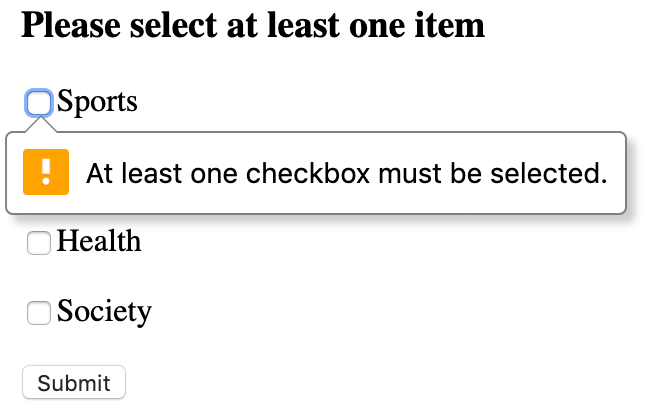
<p>Here’s how the error message will look in the Google Chrome browser when trying to send a form without selecting a checkbox:</p>

<p><img src="/assets/images/js-select-at-least-one-item.png" alt="Select at least one item form" /></p>

<p>HTML code:</p>

<div class="language-html highlighter-rouge"><div class="highlight"><pre class="highlight"><code><span class="cp">&lt;!DOCTYPE HTML&gt;</span>
<span class="nt">&lt;html&gt;</span>
  <span class="nt">&lt;head&gt;</span>
    <span class="nt">&lt;title&gt;</span>At least one checkbox must be selected<span class="nt">&lt;/title&gt;</span>
    <span class="nt">&lt;meta</span> <span class="na">charset=</span><span class="s">"utf-8"</span><span class="nt">&gt;</span>
  <span class="nt">&lt;/head&gt;</span>
  <span class="nt">&lt;body&gt;</span>
    <span class="nt">&lt;form</span> <span class="na">id=</span><span class="s">"sectionForm"</span> <span class="na">method=</span><span class="s">"post"</span><span class="nt">&gt;</span>
        <span class="nt">&lt;h3&gt;</span>Please select at least one item<span class="nt">&lt;/h3&gt;</span>

        <span class="nt">&lt;p&gt;&lt;input</span> <span class="na">type=</span><span class="s">"checkbox"</span> <span class="na">name=</span><span class="s">"section"</span> <span class="na">value=</span><span class="s">"sports"</span><span class="nt">&gt;</span>Sports<span class="nt">&lt;/p&gt;</span>
        <span class="nt">&lt;p&gt;&lt;input</span> <span class="na">type=</span><span class="s">"checkbox"</span> <span class="na">name=</span><span class="s">"section"</span> <span class="na">value=</span><span class="s">"business"</span><span class="nt">&gt;</span>Business<span class="nt">&lt;/p&gt;</span>
        <span class="nt">&lt;p&gt;&lt;input</span> <span class="na">type=</span><span class="s">"checkbox"</span> <span class="na">name=</span><span class="s">"section"</span> <span class="na">value=</span><span class="s">"health"</span><span class="nt">&gt;</span>Health<span class="nt">&lt;/p&gt;</span>
        <span class="nt">&lt;p&gt;&lt;input</span> <span class="na">type=</span><span class="s">"checkbox"</span> <span class="na">name=</span><span class="s">"section"</span> <span class="na">value=</span><span class="s">"society"</span><span class="nt">&gt;</span>Society<span class="nt">&lt;/p&gt;</span>
        
        <span class="nt">&lt;p&gt;&lt;input</span> <span class="na">type=</span><span class="s">"submit"</span> <span class="na">value=</span><span class="s">"Submit"</span><span class="nt">&gt;&lt;/p&gt;</span>
    <span class="nt">&lt;/form&gt;</span>

    <span class="nt">&lt;script </span><span class="na">src=</span><span class="s">"script.js"</span><span class="nt">&gt;&lt;/script&gt;</span>
  <span class="nt">&lt;/body&gt;</span>
<span class="nt">&lt;/html&gt;</span>
</code></pre></div></div>

<p>A content of the <code class="language-plaintext highlighter-rouge">script.js</code> file:</p>

<div class="language-javascript highlighter-rouge"><div class="highlight"><pre class="highlight"><code><span class="p">(</span><span class="kd">function</span><span class="p">()</span> <span class="p">{</span>
    <span class="kd">const</span> <span class="nx">form</span> <span class="o">=</span> <span class="nb">document</span><span class="p">.</span><span class="nf">querySelector</span><span class="p">(</span><span class="dl">'</span><span class="s1">#sectionForm</span><span class="dl">'</span><span class="p">);</span>
    <span class="kd">const</span> <span class="nx">checkboxes</span> <span class="o">=</span> <span class="nx">form</span><span class="p">.</span><span class="nf">querySelectorAll</span><span class="p">(</span><span class="dl">'</span><span class="s1">input[type=checkbox]</span><span class="dl">'</span><span class="p">);</span>
    <span class="kd">const</span> <span class="nx">checkboxLength</span> <span class="o">=</span> <span class="nx">checkboxes</span><span class="p">.</span><span class="nx">length</span><span class="p">;</span>
    <span class="kd">const</span> <span class="nx">firstCheckbox</span> <span class="o">=</span> <span class="nx">checkboxLength</span> <span class="o">&gt;</span> <span class="mi">0</span> <span class="p">?</span> <span class="nx">checkboxes</span><span class="p">[</span><span class="mi">0</span><span class="p">]</span> <span class="p">:</span> <span class="kc">null</span><span class="p">;</span>

    <span class="kd">function</span> <span class="nf">init</span><span class="p">()</span> <span class="p">{</span>
        <span class="k">if </span><span class="p">(</span><span class="nx">firstCheckbox</span><span class="p">)</span> <span class="p">{</span>
            <span class="k">for </span><span class="p">(</span><span class="kd">let</span> <span class="nx">i</span> <span class="o">=</span> <span class="mi">0</span><span class="p">;</span> <span class="nx">i</span> <span class="o">&lt;</span> <span class="nx">checkboxLength</span><span class="p">;</span> <span class="nx">i</span><span class="o">++</span><span class="p">)</span> <span class="p">{</span>
                <span class="nx">checkboxes</span><span class="p">[</span><span class="nx">i</span><span class="p">].</span><span class="nf">addEventListener</span><span class="p">(</span><span class="dl">'</span><span class="s1">change</span><span class="dl">'</span><span class="p">,</span> <span class="nx">checkValidity</span><span class="p">);</span>
            <span class="p">}</span>

            <span class="nf">checkValidity</span><span class="p">();</span>
        <span class="p">}</span>
    <span class="p">}</span>

    <span class="kd">function</span> <span class="nf">isChecked</span><span class="p">()</span> <span class="p">{</span>
        <span class="k">for </span><span class="p">(</span><span class="kd">let</span> <span class="nx">i</span> <span class="o">=</span> <span class="mi">0</span><span class="p">;</span> <span class="nx">i</span> <span class="o">&lt;</span> <span class="nx">checkboxLength</span><span class="p">;</span> <span class="nx">i</span><span class="o">++</span><span class="p">)</span> <span class="p">{</span>
            <span class="k">if </span><span class="p">(</span><span class="nx">checkboxes</span><span class="p">[</span><span class="nx">i</span><span class="p">].</span><span class="nx">checked</span><span class="p">)</span> <span class="k">return</span> <span class="kc">true</span><span class="p">;</span>
        <span class="p">}</span>

        <span class="k">return</span> <span class="kc">false</span><span class="p">;</span>
    <span class="p">}</span>

    <span class="kd">function</span> <span class="nf">checkValidity</span><span class="p">()</span> <span class="p">{</span>
        <span class="kd">const</span> <span class="nx">errorMessage</span> <span class="o">=</span> <span class="o">!</span><span class="nf">isChecked</span><span class="p">()</span> <span class="p">?</span> <span class="dl">'</span><span class="s1">At least one checkbox must be selected.</span><span class="dl">'</span> <span class="p">:</span> <span class="dl">''</span><span class="p">;</span>
        <span class="nx">firstCheckbox</span><span class="p">.</span><span class="nf">setCustomValidity</span><span class="p">(</span><span class="nx">errorMessage</span><span class="p">);</span>
    <span class="p">}</span>

    <span class="nf">init</span><span class="p">();</span>
<span class="p">})();</span>
</code></pre></div></div>]]></content><author><name>Ihor Vyspiansky</name></author><category term="JavaScript" /><category term="checkbox" /><category term="setCustomValidity" /><summary type="html"><![CDATA[There is a form with multiple checkboxes and we’re going to make sure that at least one is checked using pure JavaScript. To set a custom validation error message, we will use setCustomValidity() method.]]></summary></entry><entry><title type="html">How to fix imprecise calculations in JavaScript</title><link href="https://vyspiansky.github.io/2019/01/20/imprecise-calculations-in-javascript/" rel="alternate" type="text/html" title="How to fix imprecise calculations in JavaScript" /><published>2019-01-20T00:00:00+02:00</published><updated>2019-01-20T00:00:00+02:00</updated><id>https://vyspiansky.github.io/2019/01/20/imprecise-calculations-in-javascript</id><content type="html" xml:base="https://vyspiansky.github.io/2019/01/20/imprecise-calculations-in-javascript/"><![CDATA[<p>What is it about? Try to execute some of the following examples in the browser console (or somehow using JavaScript) and you will see that sometimes there are small computational errors.</p>

<p>Browser console output:</p>

<div class="language-plaintext highlighter-rouge"><div class="highlight"><pre class="highlight"><code>&gt; 0.1 + 0.2
0.30000000000000004
</code></pre></div></div>

<div class="language-plaintext highlighter-rouge"><div class="highlight"><pre class="highlight"><code>&gt; 0.1 * 0.2
0.020000000000000004
</code></pre></div></div>

<div class="language-plaintext highlighter-rouge"><div class="highlight"><pre class="highlight"><code>&gt; 16.08 * 100
1607.9999999999998
</code></pre></div></div>

<div class="language-plaintext highlighter-rouge"><div class="highlight"><pre class="highlight"><code>&gt; 0.1.toFixed(20)
"0.10000000000000000555"
</code></pre></div></div>

<div class="language-plaintext highlighter-rouge"><div class="highlight"><pre class="highlight"><code>&gt; 9999999999999999
10000000000000000
</code></pre></div></div>

<p>Don’t get me wrong, this is certainly not a problem of the language itself. The same thing happens in Java, C, PHP, Ruby, etc. If you are interested in the details, please read more in <a href="https://javascript.info/number#imprecise-calculations">this article</a>.</p>

<p>Below you will find the simplest solutions that allow to “fix” this inaccuracy.</p>

<h2 id="solution-1">Solution #1</h2>

<p>Let’s use the <a href="https://developer.mozilla.org/en-US/docs/Web/JavaScript/Reference/Global_Objects/Number/toPrecision">toPrecision</a> method to format a number to a specified precision.</p>

<div class="language-javascript highlighter-rouge"><div class="highlight"><pre class="highlight"><code><span class="c1">// Pedro Ladaria's solution</span>
<span class="kd">function</span> <span class="nf">strip</span><span class="p">(</span><span class="nx">number</span><span class="p">)</span> <span class="p">{</span>
    <span class="k">return </span><span class="p">(</span><span class="nf">parseFloat</span><span class="p">(</span><span class="nx">number</span><span class="p">.</span><span class="nf">toPrecision</span><span class="p">(</span><span class="mi">12</span><span class="p">)));</span>
<span class="p">}</span>
</code></pre></div></div>

<p>Browser console:</p>

<div class="language-plaintext highlighter-rouge"><div class="highlight"><pre class="highlight"><code>&gt; strip(0.1 + 0.2);
0.3
</code></pre></div></div>

<div class="language-plaintext highlighter-rouge"><div class="highlight"><pre class="highlight"><code>&gt; strip(0.1 * 0.2);
0.02
</code></pre></div></div>

<div class="language-plaintext highlighter-rouge"><div class="highlight"><pre class="highlight"><code>&gt; strip(16.08 * 100);
1608
</code></pre></div></div>

<h2 id="solution-2">Solution #2</h2>

<p>Let’s format a number using fixed-point notation into a string with 2 (up to 20) digits after the decimal point using the <a href="https://developer.mozilla.org/en-US/docs/Web/JavaScript/Reference/Global_Objects/Number/toFixed">toFixed</a> method.</p>

<p>Browser console:</p>

<div class="language-plaintext highlighter-rouge"><div class="highlight"><pre class="highlight"><code>&gt; (0.1 + 0.2).toFixed(2)
"0.30"
</code></pre></div></div>

<div class="language-plaintext highlighter-rouge"><div class="highlight"><pre class="highlight"><code>&gt; (0.1 * 0.2).toFixed(2)
"0.02"
</code></pre></div></div>

<div class="language-plaintext highlighter-rouge"><div class="highlight"><pre class="highlight"><code>&gt; (16.08 * 100).toFixed(2)
"1608.00"
</code></pre></div></div>

<p>It’s not hard to get a number as a return value. For instance,</p>

<div class="language-plaintext highlighter-rouge"><div class="highlight"><pre class="highlight"><code>&gt; parseFloat((0.1 + 0.2).toFixed(2))
0.3
</code></pre></div></div>]]></content><author><name>Ihor Vyspiansky</name></author><category term="JavaScript" /><category term="calculation" /><category term="parseFloat" /><category term="toFixed" /><summary type="html"><![CDATA[What is it about? Try to execute some of the following examples in the browser console (or somehow using JavaScript) and you will see that sometimes there are small computational errors.]]></summary></entry><entry><title type="html">Set up PHP 7.2 on macOS Mojave (with homebrew)</title><link href="https://vyspiansky.github.io/2018/11/08/set-up-php-7.2-on-macos-mojave-with-homebrew/" rel="alternate" type="text/html" title="Set up PHP 7.2 on macOS Mojave (with homebrew)" /><published>2018-11-08T00:00:00+02:00</published><updated>2018-11-08T00:00:00+02:00</updated><id>https://vyspiansky.github.io/2018/11/08/set-up-php-7.2-on-macos-mojave-with-homebrew</id><content type="html" xml:base="https://vyspiansky.github.io/2018/11/08/set-up-php-7.2-on-macos-mojave-with-homebrew/"><![CDATA[<p>To check the version of PHP in the terminal, type the following command:</p>

<div class="language-bash highlighter-rouge"><div class="highlight"><pre class="highlight"><code>php <span class="nt">-v</span>
</code></pre></div></div>

<p>or can see what versions of PHP are installed with </p>

<div class="language-bash highlighter-rouge"><div class="highlight"><pre class="highlight"><code>brew list | <span class="nb">grep </span>php
</code></pre></div></div>

<p>Maybe it’s worth cleaning up some of the old packages from brew. It’s up to you.</p>

<p>Make sure brew is up to date:</p>

<div class="language-bash highlighter-rouge"><div class="highlight"><pre class="highlight"><code>brew update
brew upgrade
</code></pre></div></div>

<p>Let’s finally install 7.2 version of PHP</p>

<div class="language-bash highlighter-rouge"><div class="highlight"><pre class="highlight"><code>brew <span class="nb">install </span>php@7.2
</code></pre></div></div>

<p>If you need to have this version of PHP first in your <code class="language-plaintext highlighter-rouge">PATH</code> run the following command:</p>

<div class="language-bash highlighter-rouge"><div class="highlight"><pre class="highlight"><code><span class="nb">echo</span> <span class="s1">'export PATH="/usr/local/opt/php@7.2/bin:$PATH"'</span> <span class="o">&gt;&gt;</span> ~/.bash_profile
<span class="nb">echo</span> <span class="s1">'export PATH="/usr/local/opt/php@7.2/sbin:$PATH"'</span> <span class="o">&gt;&gt;</span> ~/.bash_profile
<span class="nb">source</span> ~/.bash_profile
</code></pre></div></div>

<p>And the result?</p>

<div class="language-bash highlighter-rouge"><div class="highlight"><pre class="highlight"><code>php <span class="nt">--version</span>
</code></pre></div></div>

<p>Where is a php.ini file?</p>

<p>Your .ini file is located in <code class="language-plaintext highlighter-rouge">/usr/local/etc/php/7.2/php.ini</code>. To check just type</p>

<div class="language-bash highlighter-rouge"><div class="highlight"><pre class="highlight"><code>php <span class="nt">--ini</span>
</code></pre></div></div>

<p>How to install extensions?</p>

<p>PHP extensions have been removed and now should be installed from <code class="language-plaintext highlighter-rouge">PECL</code>:</p>

<div class="language-bash highlighter-rouge"><div class="highlight"><pre class="highlight"><code>pecl <span class="nb">install </span>xdebug
</code></pre></div></div>]]></content><author><name>Ihor Vyspiansky</name></author><category term="Mac" /><category term="command line" /><category term="terminal" /><category term="PHP" /><category term="homebrew" /><summary type="html"><![CDATA[To check the version of PHP in the terminal, type the following command:]]></summary></entry><entry><title type="html">Error: tool ’xcodebuild’ requires Xcode… on macOS</title><link href="https://vyspiansky.github.io/2018/09/28/xcodebuild-requires-xcode/" rel="alternate" type="text/html" title="Error: tool ’xcodebuild’ requires Xcode… on macOS" /><published>2018-09-28T00:00:00+03:00</published><updated>2018-09-28T00:00:00+03:00</updated><id>https://vyspiansky.github.io/2018/09/28/xcodebuild-requires-xcode</id><content type="html" xml:base="https://vyspiansky.github.io/2018/09/28/xcodebuild-requires-xcode/"><![CDATA[<p>If you get the following error with <code class="language-plaintext highlighter-rouge">npm install</code></p>

<div class="language-plaintext highlighter-rouge"><div class="highlight"><pre class="highlight"><code> xcode-select: error: tool 'xcodebuild' requires Xcode, but active developer directory'/Library/Developer/CommandLineTools' is a command line tools instance
</code></pre></div></div>

<p>then to fix it try</p>

<ol>
  <li>(optional) Install <code class="language-plaintext highlighter-rouge">Xcode</code> - go to the AppStore and <a href="https://itunes.apple.com/us/app/xcode/id497799835">download the Xcode</a>.</li>
  <li>Point the <code class="language-plaintext highlighter-rouge">xcode-select</code> developer directory to the appropriate directory from within <code class="language-plaintext highlighter-rouge">Xcode.app</code>. To do this, run</li>
</ol>

<div class="language-bash highlighter-rouge"><div class="highlight"><pre class="highlight"><code><span class="nb">sudo </span>xcode-select <span class="nt">-s</span> /Applications/Xcode.app/Contents/Developer
</code></pre></div></div>]]></content><author><name>Ihor Vyspiansky</name></author><category term="Mac" /><category term="command line" /><category term="terminal" /><category term="Xcode" /><summary type="html"><![CDATA[If you get the following error with npm install]]></summary></entry><entry><title type="html">Launch Sublime Text 3 from the terminal</title><link href="https://vyspiansky.github.io/2018/08/30/launch-sublime-text-3-terminal/" rel="alternate" type="text/html" title="Launch Sublime Text 3 from the terminal" /><published>2018-08-30T00:00:00+03:00</published><updated>2018-08-30T00:00:00+03:00</updated><id>https://vyspiansky.github.io/2018/08/30/launch-sublime-text-3-terminal</id><content type="html" xml:base="https://vyspiansky.github.io/2018/08/30/launch-sublime-text-3-terminal/"><![CDATA[<div class="language-plaintext highlighter-rouge"><div class="highlight"><pre class="highlight"><code>$ echo $PATH
</code></pre></div></div>

<p>Output: /usr/local/bin:/usr/bin:/bin:/usr/sbin:/sbin</p>

<p>Create a symbolic link</p>

<div class="language-plaintext highlighter-rouge"><div class="highlight"><pre class="highlight"><code>$ ln -s "/Applications/Sublime Text.app/Contents/SharedSupport/bin/subl" /usr/local/bin/subl
</code></pre></div></div>

<p>To open the entire current directory</p>

<div class="language-plaintext highlighter-rouge"><div class="highlight"><pre class="highlight"><code>$ subl .
</code></pre></div></div>]]></content><author><name>Ihor Vyspiansky</name></author><category term="Mac" /><category term="command line" /><category term="terminal" /><category term="Sublime Text" /><summary type="html"><![CDATA[$ echo $PATH]]></summary></entry><entry><title type="html">Install AWS CLI on macOS</title><link href="https://vyspiansky.github.io/2018/03/17/install-aws-cli-on-macos/" rel="alternate" type="text/html" title="Install AWS CLI on macOS" /><published>2018-03-17T00:00:00+02:00</published><updated>2018-03-17T00:00:00+02:00</updated><id>https://vyspiansky.github.io/2018/03/17/install-aws-cli-on-macos</id><content type="html" xml:base="https://vyspiansky.github.io/2018/03/17/install-aws-cli-on-macos/"><![CDATA[<h2 id="easiest-way-to-install-aws-cli">Easiest way to install AWS CLI</h2>

<div class="language-plaintext highlighter-rouge"><div class="highlight"><pre class="highlight"><code>$ brew install awscli
</code></pre></div></div>

<p>See more <a href="http://www.chrisjmendez.com/2017/02/18/aws-installing-aws-client-using-homebrew/">http://www.chrisjmendez.com/2017/02/18/aws-installing-aws-client-using-homebrew/</a></p>

<h2 id="a-bit-longer-way">A bit longer way…</h2>

<div class="language-plaintext highlighter-rouge"><div class="highlight"><pre class="highlight"><code>$ brew install python3
$ python3 --version
</code></pre></div></div>

<div class="language-plaintext highlighter-rouge"><div class="highlight"><pre class="highlight"><code>$ sudo mkdir /usr/local/Frameworks
$ sudo chown $(whoami):admin /usr/local/Frameworks
</code></pre></div></div>

<div class="language-plaintext highlighter-rouge"><div class="highlight"><pre class="highlight"><code>$ brew link python
</code></pre></div></div>

<div class="language-plaintext highlighter-rouge"><div class="highlight"><pre class="highlight"><code>Error: pip3: command not found 
$ brew postinstall python3
$ pip3 --version
</code></pre></div></div>

<p>URL: <a href="https://docs.aws.amazon.com/cli/latest/userguide/cli-install-macos.html">https://docs.aws.amazon.com/cli/latest/userguide/cli-install-macos.html</a></p>]]></content><author><name>Ihor Vyspiansky</name></author><category term="DevOps" /><category term="AWS CLI" /><category term="Mac" /><category term="AWS" /><summary type="html"><![CDATA[Easiest way to install AWS CLI]]></summary></entry></feed>